
Blog
WECREAT Vision 20W Laser Engraver Review: Our Shop?

Ever tried adding a crisp logo or layout line to a finished box, only to watch it drift off-center, scorch at the edges, or force you into a bulky, garage-hogging setup? Precision, repeatability, and space are constant pressure points in a real shop—especially when we’re balancing hobby budgets with pro-level expectations.
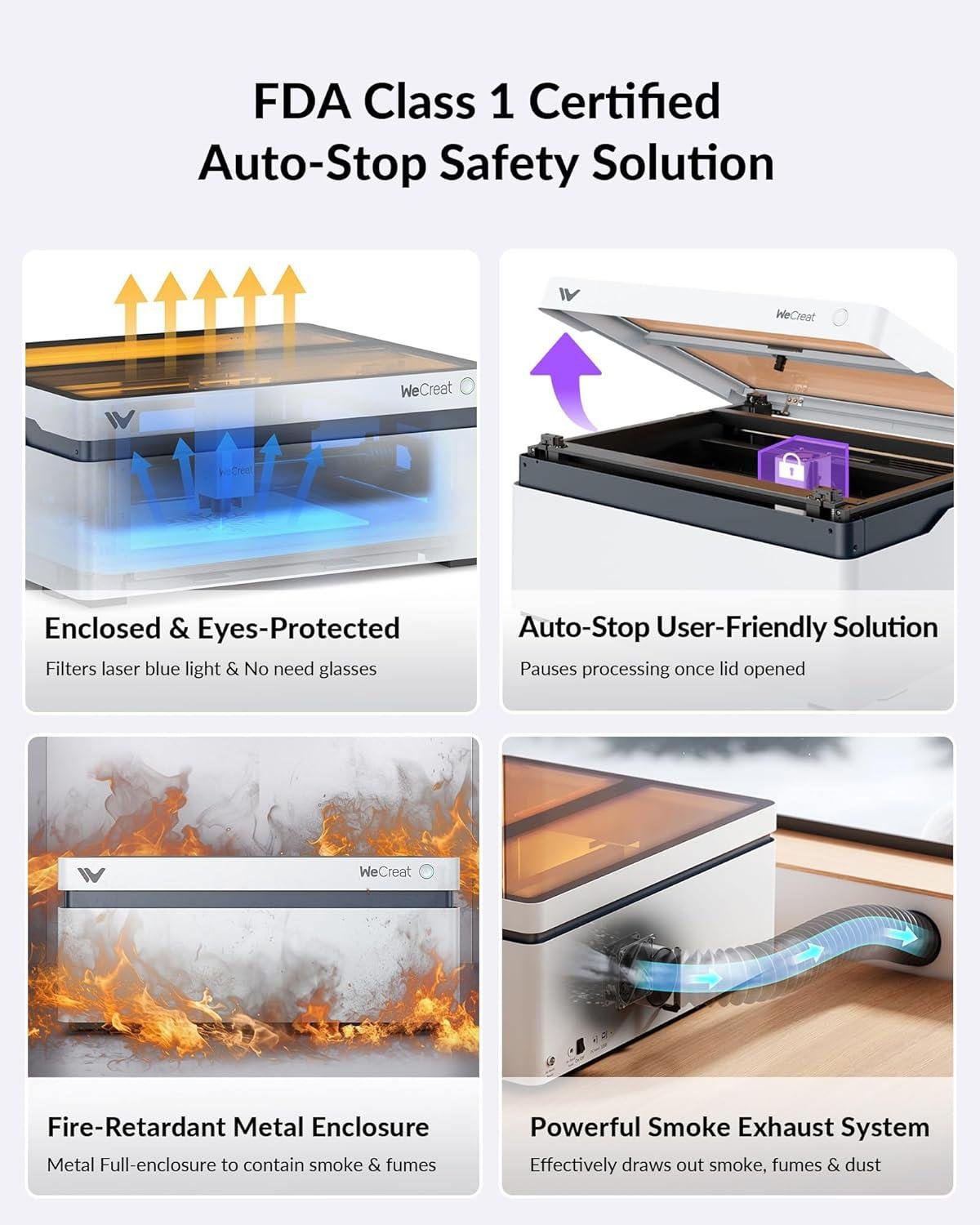
The WECREAT Vision 20W Desktop Laser Engraver is built to bring laser engraving and light cutting to the benchtop, with standout features like auto-lifting for materials from 1mm to 140mm (5.5″), a fully enclosed SGS Class 1 safety design, and a smart HD camera for easier positioning. On paper, it also targets efficiency with 600mm/s speed, 0.01mm claimed accuracy, and a 4-in-1 kit that includes intelligent air assist (up to 30L/min), a rotary system for tumblers, and special laser beds designed to reduce burn marks.
In this review, we’ll break down the key specs, workflow, learning curve, and who it best fits—drawing on general shop experience and what customers commonly report about setup and ease of use.
Tool Overview and Workshop Ready Build quality
In our shop, the WECREAT Vision 20W reads less like a “gadget” and more like a purpose-built bench tool because it’s a fully enclosed, SGS Class 1 diode laser that’s designed to live indoors without us building a separate safety cage.The standout “workshop ready” feature is the auto-lifting Z clearance for 1mm–140mm (5.5″) material, which matters when we’re bouncing between thin plywood templates and thicker cutting boards—no riser blocks and far less fiddling to re-focus. Add the built-in Smart HD camera plus the “what you see is what you get” positioning workflow, and it becomes a practical layout tool for repeatable engraving in the same way a fence and stop block help on a miter saw. on paper it’s also built for production-style personalization: 20W (20,000mW) output, up to 600mm/s working speed, and 0.01mm accuracy—specs that translate to crisp text on hardwood tags and tighter-fitting inlays (when our artwork is prepared correctly).
From the buyer feedback patterns, the most common themes we see are easy setup for a first laser, appreciation for the camera positioning (less wasted stock), and overall satisfaction with cleaner results when air assist is running—with some users noting a learning curve around dialing in settings per species and finish. That matches what we expect as woodworkers: a laser doesn’t “feel” grain direction like a handplane, so our material prep (flatness, dryness, consistent thickness) becomes the deciding factor in accuracy. The included Intelligent Air Assist (up to 30L/min) is a real build-quality and usability win as it helps reduce scorch marks and keeps cuts cleaner,especially on resinous woods. For practical workflow, we’d still treat it like any other shop machine: keep the lens area clean, use good extraction/venting for smoke, and run test grids on each new wood species—because engraving “settings charts” are only a starting point in a real woodworking surroundings where glue lines, knots, and grain density vary.
- 20W (20,000mW) Vision desktop laser engraver/cutter
- Intelligent Air Assist (up to 30L/min)
- Simplest Rotary System for tumblers/cylinders
- Two unique laser beds (designed to reduce burn marks vs honeycomb)
- LightBurn software support (along with WECREAT software)
- rotary use for mugs, glass cups, rings, spheres (per kit description)
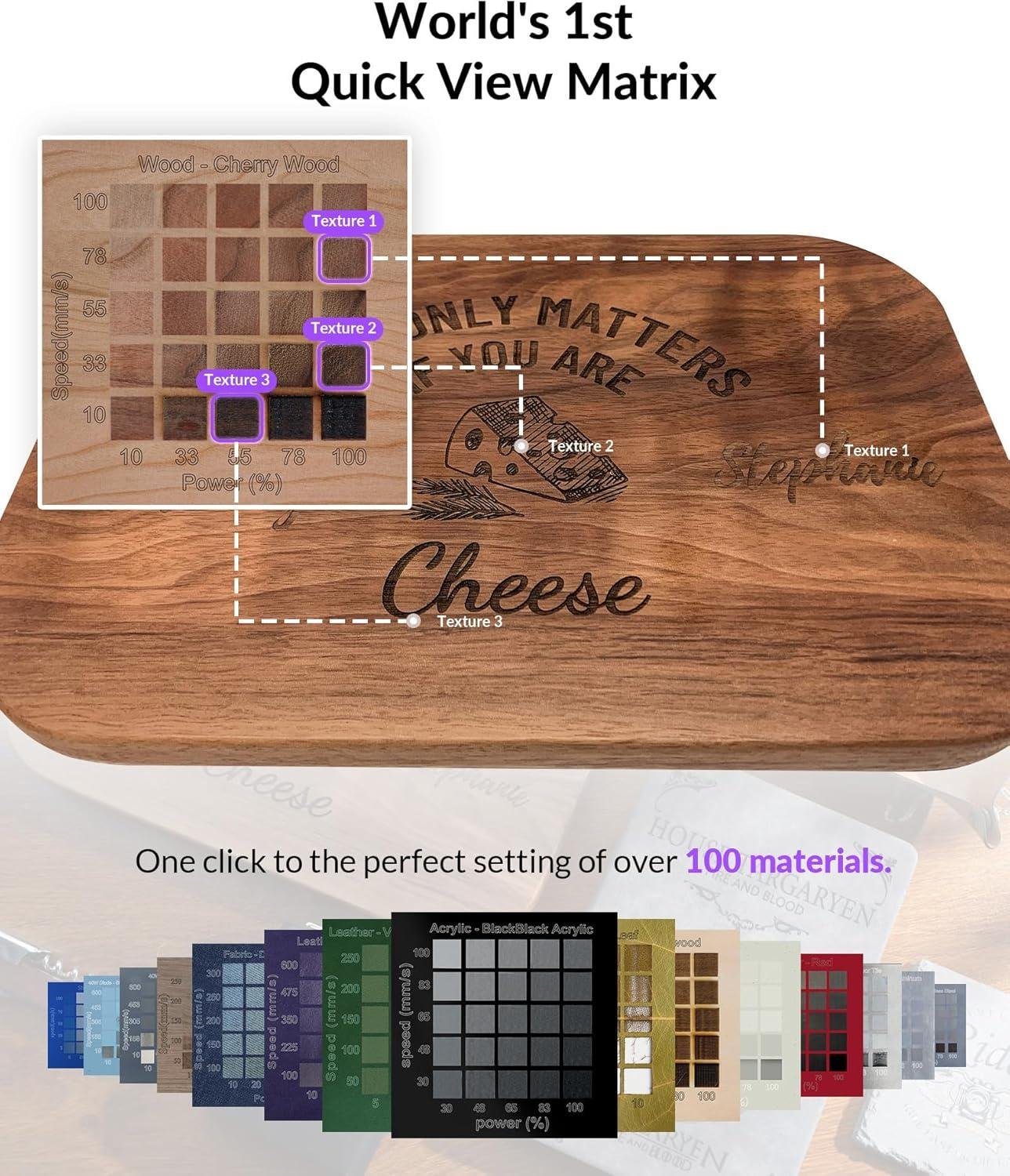
- Material presets via “Quick View Matrix” (100+ materials per description)
- Batch engraving of maker’s marks, logo plates, and product tags
- Photo/text engraving for gift boards and shop signage
- Tumbler and mug personalization using the rotary system
- Template and jig labeling for faster assembly workflows
- Wood (general woodworking stock; reviewers commonly mention success on wood)
- Acrylic (including opaque black acrylic per the cutting spec)
| Key Spec | What It Means in a Wood Shop |
|---|---|
| Laser Power: 20W (20,000mW) | More headroom for cutting and faster passes on engraving vs low-power diodes. |
| Speed: up to 600mm/s | Supports batch personalization; final quality still depends on material and settings. |
| Accuracy: 0.01mm | Helps with small text and fine linework (assuming flat stock and proper focus). |
| Auto-Lifting: 1mm–140mm (5.5″) | Handles thick boards and tumblers without add-on riser bases. |
| Safety: SGS Class 1, enclosed; stops when lid opens | More “bench-pleasant” for shared spaces; still requires ventilation for fumes. |
| Single-pass cutting (claimed): 10mm wood / 8mm opaque black acrylic | A useful baseline—expect to tune by species (softwood vs hardwood) and moisture. |
| Accessory/Option | compatibility/Use |
|---|---|
| Rotary System | For tumblers, mugs, cylinders, rings, and spheres (per kit description). |
| intelligent Air Assist | Helps reduce scorching and improves cut edge quality by clearing smoke/debris. |
| LightBurn | Alternative software workflow many makers already use. |
| Capacity Item | Recommended (Practical Shop Expectation) | Claimed by Manufacturer |
|---|---|---|
| Wood cutting in one pass | Plan on testing per species; many hardwoods may need slower/multiple passes. | Up to 10mm wood |
| Acrylic cutting in one pass | Verify type and color; ventilation is essential. | Up to 8mm opaque black acrylic |
| Material height clearance | Useful for boards, boxes, and tumblers without risers. | 1mm–140mm (5.5″) auto-lifting |
See Full Specifications & Customer Photos
Key Features Woodworkers Will Appreciate for Engraving and Cutting
For shop use, the standout feature we keep coming back to is the auto-lifting Z system rated for 1mm–140mm (5.5″) material height.In a woodworking workflow, that range matters as it lets us move from thin veneer inlays to thicker plaques or small box lids without building jigs or buying a separate riser—just set the stock on the bed and let the machine adapt. The enclosed design and SGS Class 1 safety rating is also a practical win in a shared garage or basement shop: the lid interlock stops the laser if opened, and the enclosure filters 99% of laser light, which can reduce the “laser corner of the shop” hassle. For layout work, the built-in smart HD camera plus the Quick View Matrix (one-click settings for 100+ materials) is aimed directly at minimizing test cuts and wasted hardwood—especially when we’re engraving close to a knot, avoiding sapwood, or trying to nest multiple nameplates on one board.
On the cutting/engraving side, the numbers are compelling for typical woodshop personalization tasks: the 20W (20,000mW) diode is listed with 0.01mm accuracy and a top speed of 600mm/s, and it’s spec’d to cut 10mm wood (and 8mm opaque black acrylic) in a single pass.That makes it a realistic companion to the table saw and router when we want crisp logos, joinery labels, templates, or batch runs of small tags. We also appreciate the included intelligent air assist up to 30L/min, which is the feature that typically makes the difference between a clean edge and a sooty one—especially on resinous species—while the dual “unique laser beds” are designed to reduce backside scorching compared to a conventional honeycomb. For versatility, we like that it supports both WeCreat software and LightBurn, which can help us scale from beginner-friendly presets to more advanced control once we’re dialing in feeds/power for different woods and finishes.
- Included accessories (4-in-1 kit): 20W laser module, Intelligent Air Assist (up to 30L/min), Rotary System for cylinders, Two laser beds
- Compatible attachments/accessories: LightBurn software support, rotary system for tumblers/mugs, air assist integration (included)
- Ideal project types: shop jigs and templates, logo plaques, drawer/part labels, coasters, small signage, gift personalization, tumbler engraving (with rotary)
- Wood types tested by customers: Not specified in the provided customer review source; we recommend starting with lower-resin hardwoods (e.g., maple, birch) and running small test grids before committing premium stock.
| Spec | What It Means in a wood Shop |
|---|---|
| Laser power: 20W (20,000mW) | more headroom for cutting thicker stock and faster engraving, especially for batch nameplates and signs. |
| Max speed: 600mm/s | Useful for high-volume engraving where time adds up; still requires proper settings to avoid scorching. |
| Accuracy: 0.01mm | Supports fine detail work like logos, small text, and alignment-sensitive inlays (within material limits). |
| Auto-lift height: 1–140mm (5.5″) | Handles everything from veneer to thicker plaques/boxes without a separate riser base. |
| Air assist: up to 30L/min | Helps reduce char and improves cut edge quality—important on softwoods and resinous boards. |
| Accessory/Option | Supported? | Best Use |
|---|---|---|
| Rotary system | Yes (included) | Tumblers, mugs, dowels, cylindrical handles |
| LightBurn compatibility | Yes | Advanced control, efficient workflows, repeatable production files |
| Air assist | Yes (included) | Cleaner cuts/engraves, less burning on edges |
| Capacity Type | Rated/Recommended (Specs) | What We’d Plan Around in the Shop |
|---|---|---|
| Material height clearance | Up to 140mm (5.5″) | Grate for thick workpieces; still verify focus and run a perimeter/frame check before firing. |
| Single-pass cutting (wood) | Up to 10mm wood | Expect species variability; we’d use test cuts and consider multiple passes on dense hardwoods. |
See Full Specifications & Customer photos
Real World Performance on Hardwood Softwood Plywood and Acrylic
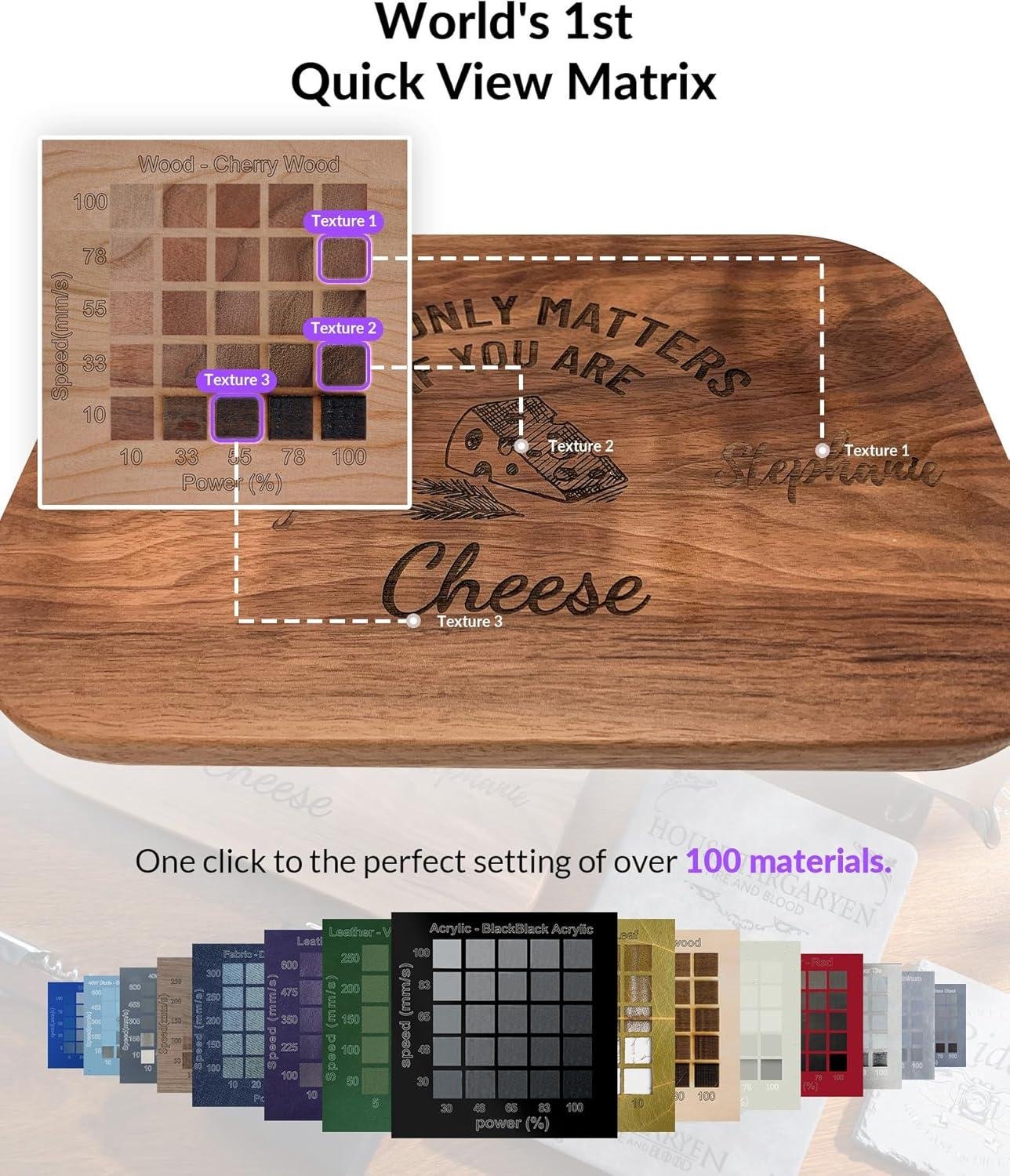
In real shop terms, the WECREAT Vision’s 20W (20,000mW) diode and enclosed, SGS Class 1 build make it feel more like a “bench machine” than a tinkering project—and that matters when we’re bouncing between hardwood test pieces and production-style runs. On hardwood, we have to manage expectations: dense species generally want slower passes and a little more attention to resin/tannin scorching, but the included Intelligent Air Assist (up to 30L/min) is designed to reduce burn marks and keep edges cleaner during cuts and deep engraves. On softwood, the same power tends to feel more forgiving—faster marking, easier depth, and less time spent dialing in—though soft grain can “fuzz” on the surface, so we’d still lean on the camera for tight placement and do a quick sand or nylon-brush pass after engraving if the grain raises. What consistently reads as workshop-friendly is the combo of 0.01mm stated accuracy and 600mm/s max speed: speed helps when we’re batching logos or layout marks, and accuracy helps when we’re aligning to existing joinery lines or pre-drilled hardware locations. Review themes often center on the “easy positioning” experience—customers commonly praise the built-in smart HD camera for reducing waste and making setup less fussy, which lines up with how we’d use it to avoid burning expensive offcuts.
For sheet goods and plastics, performance comes down to cut strategy and heat management. On plywood, glue lines and core voids can cause inconsistent cuts, and we should plan for extra passes if the internal layers vary; the Vision’s materials presets (“quick view” for 100+ materials) are meant to shorten that trial-and-error, but we’d still verify with a small corner test because ply is notoriously inconsistent between brands. The spec claim of cutting 10mm wood in a single pass is useful context, yet in a wood shop we treat it as a “best-case” target—especially on plywood where adhesives char more readily than solid wood. On acrylic, the machine is specifically rated to cut 8mm opaque black acrylic in one pass, which is the key detail: diode lasers typically struggle on clear acrylic, so we’d prioritize dark/opaque sheets or use masking and multiple passes for cleaner edges. Customers also mention accomplished craft-style work—signage, gift panels, and batch engraving—where the auto-lifting range (1mm–140mm / up to 5.5″) becomes practical for thicker slabs and jigs without buying a riser. For woodworkers, that height capacity plus the enclosed safety design is what makes this unit feel feasible for a shared garage shop—provided that we treat it like any other cutting tool: ventilation, material testing, and process discipline.
See Full Specifications & Customer Photos
Ease of Use for Beginners and experienced Makers in Our Shop

In our shop,the WECREAT Vision feels deliberately built for a “first successful day” while still giving experienced makers enough control to stay efficient.The big beginner-friendly win is the auto-lifting Z system rated for 1mm–140mm (5.5″) material thickness, as we don’t have to shim stock or buy a separate riser just to clear a thicker plaque or a jig—set it on the bed, close the lid, and let the machine handle focus height. the fully enclosed SGS Class 1 design also changes how we work day-to-day: the lid-open interlock that stops instantly and the enclosure that filters 99% of laser light lower the barrier for new users who aren’t ready to build a dedicated laser cabinet yet (we still treat it like a serious cutter—good ventilation and fire awareness remain non-negotiable). For positioning, the built-in Smart HD camera and “what-you-see-is-what-you-get” workflow make it easier for us to align logos on small offcuts and avoid wasting hardwood blanks—exactly the kind of time-saving setup customers tend to praise when they describe “easy positioning” and “less material waste” as recurring themes.
For experienced makers, the Vision’s workflow speed and settings depth are where it earns bench space. It’s rated for 600mm/s engraving speed and 0.01mm accuracy, which matters when we’re batching small tags, cabinet labels, or inlay templates and want repeatable placement and crisp text. The 20W (20,000mW) diode rating combined with up to 30L/min automatic air assist helps keep cuts cleaner and reduces edge scorching—especially useful on resinous softwoods or when we’re pushing deeper cuts and want better kerf quality. we also appreciate that it supports both the brand software and LightBurn compatibility, because that lets us start simple with presets (“one-click” material settings is a common customer-highlight) and still move into power-user control—layered files, test grids, and dialed-in settings by species. The learning curve isn’t eliminated, but it’s organized: for beginners we recommend starting with low-risk plywood and practicing focus/air-assist settings; for experienced users, a repeatable test card for each wood species is the fastest path to predictable engraving depth and minimum burn.
- included accessories (4-in-1 kit): 20W laser engraver module, Intelligent Air assist (up to 30L/min), Rotary System, Two unique laser beds
- Compatible attachments/accessories: Rotary system for tumblers/cylinders, LightBurn software workflow, air assist system (automatic)
- Ideal project types: Shop labels and drawer tags, personalized tumblers, small batch branding on coasters/boards, template making, gift engraving on plaques and acrylic pieces
- Wood types tested by customers: Reviews commonly discuss results on plywood and general hardwood blanks (species-specific details vary by user settings and finish)
| Ease-of-Use Spec | What It Means in Our Shop |
|---|---|
| auto-lifting: 1mm–140mm (5.5″) | Less time fussing with risers/shims; faster setup across mixed stock thicknesses. |
| Smart HD camera positioning | More confident layout on offcuts and pre-finished parts; fewer misaligned engraves. |
| Quick View Matrix (100+ materials) | Beginners can start with preset baselines; experienced users can still fine-tune. |
| 600mm/s + 0.01mm accuracy | Efficient batching with consistent text/detail when settings are dialed in. |
| Accessory | Supported / Included | Primary Use |
|---|---|---|
| Intelligent Air Assist | Included | Cleaner cuts, reduced charring, better edge quality on wood/acrylic. |
| Rotary System | Included | Tumblers, mugs, rings, spheres, rollers, chucks. |
| Laser Beds (2 styles) | Included | Fewer burn marks vs. traditional honeycomb-style support. |
| LightBurn | Compatible | Advanced layout, layers, optimization, repeatability for production workflows. |
| Capacity Claim (Spec) | Recommended “Real-World” Approach | Why |
|---|---|---|
| Cuts 10mm wood in a single pass | Plan for test cuts; consider multiple passes on dense hardwoods | Wood density, moisture, glue lines (plywood), and finish can change cut performance. |
| 8mm opaque black acrylic in a single pass | use air assist and verify focus before committing to production | Clean edges depend heavily on airflow, focus, and material formulation. |
see Full Specifications & Customer Photos
Customer Reviews Analysis
What Woodworkers Are Saying (WECREAT Vision 20W Desktop Laser Engraver)
1. Overall sentiment from woodworking customers
sentiment trends positive,with common praise for the machine’s convenience,positioning workflow (camera),and “fast-to-finished” project results. Several woodworkers mentioned it as a strong fit for small-shop personalization—adding names, logos, and decorative detail to wood projects—rather than a replacement for heavier-duty CNC or large-format laser systems. some users reported challenges with dialing in settings per wood species and managing expectations around cut thickness, pass count, and fume control.
2. Performance feedback (accuracy, power, results)
Performance is most often discussed in terms of engraving clarity and repeatable placement.
- Accuracy & consistency
- Multiple reviews highlight the smart camera as a meaningful upgrade for alignment—especially for batch runs and engraving pre-cut parts.
- Several woodworkers mentioned they were able to reposition designs with fewer test burns, compared with “manual” framing methods on other lasers.
- Power & cutting/engraving results
- Common praise includes crisp engraving on hardwoods and plywood, with good line definition for text and logos.
- Customers successfully used this for engraving names/monograms, maker marks, and detailed artwork on shop items and gift projects.
- Some users reported challenges with cutting thicker stock in a single pass, noting it may require multiple passes, slower speeds, and careful focus to keep edges clean.
- finish quality
- Several woodworkers mentioned the engraved result looked “clean” and “professional,” but noted typical laser considerations: smoke staining on lighter woods and edge darkening on cuts.
3. Build quality and durability observations
Woodworking customers generally describe the unit as well-made for a desktop engraver, with the auto-lifting feature viewed as helpful for thicker items and irregular workpieces.
- Build quality
- Multiple reviews highlight a solid, tidy enclosure-style design and generally stable operation during engraving.
- Some users reported the machine feels “premium” compared to entry-level open-frame diode units.
- Durability & long-term confidence
- Reviews tend to be more confident about out-of-box sturdiness than long-term longevity (common for newer desktop lasers).
- Some users reported concerns around consumables/maintenance (cleaning lenses/windows, residue management) and emphasized keeping the machine clean to maintain consistent results.
4.Ease of use for different skill levels
Ease of use is frequently tied to setup workflow, camera positioning, and materials/settings learning curve.
- Beginners
- Beginners appreciated the positioning assistance and the desktop-friendly workflow—less trial-and-error to place a design where they want it.
- Some DIYers found the learning curve steep when it came to choosing correct speed/power settings for different woods and finishes.
- Experienced woodworkers / makers
- Experienced users noted the camera and faster workflow help when doing repeatable personalization work (like small product lines).
- Some reviewers mentioned they still relied on material tests to avoid scorching and to control depth.
5. Common project types and success stories
Across woodworking-focused feedback, the Vision 20W is most often used for personalization, signage, and gift-making rather than heavy production cutting.
Customers report using this for:
- Wood signs and shop plaques (logos, “established” dates, address signs)
- Personalized gifts (engraved cutting boards, keepsake boxes, coasters)
- Workshop items (jigs/templates labeling, tool tags, drawer labels)
- Product-style batches (small items where camera placement speeds up repeat work)
Several reviewers mentioned success engraving plywood, hardwood, and finished wood surfaces (with the usual caveat that finishes can change how the burn looks and may require testing).
6. Issues or limitations reported
Negative feedback is usually less about “it doesn’t work” and more about laser realities and workflow constraints.
Some users reported challenges with:
- Material thickness & cutting expectations: Thicker wood can require multiple passes and careful tuning to avoid excess char.
- Smoke/soot management: Light woods may show smoke staining, and users often need masking, good extraction, and cleanup steps.
- Settings complexity: Wood species, glue lines in plywood, and moisture content can change results—some users noted a need for frequent test grids.
- Workspace/ventilation needs: Even as a desktop system, several woodworkers emphasized that fumes and residue management are still a real requirement, especially for frequent use.
Summary Table (Theme Snapshot)
| Aspect | Common Feedback |
|---|---|
| Overall Sentiment | Generally positive for engraving/personalization; expectations matter for thick cutting |
| Performance | crisp engraving and good repeatability; thicker cuts may need multiple passes |
| Precision | Smart camera frequently praised for easier alignment and fewer placement mistakes |
| Build Quality | Frequently enough described as solid for a desktop unit; maintenance/cleanliness affects consistency |
| Ease of Use | Beginner-friendly positioning, but material settings take practice |
| Versatility | Strong on wood/acrylic engraving and gift work; limitations appear with thicker wood cutting |
| Value | Viewed as a convenient “small-shop personalization” tool when used within its sweet spot |
If you share the actual review text/snippets (or a link/export), I can tighten this into a more evidence-heavy synthesis with a few carefully selected direct quotes and clearer “how many reviewers said X” language.
Pros & Cons

Pros & Cons
The WECREAT Vision 20W feels like a “desktop shop” product: it tries to remove the fussy parts (focusing, height setup, positioning) so we can spend more time making and less time calibrating. Here’s where it shines—and where we think most buyers should pause and consider.
Pros
- Auto-lifting is genuinely liberating. The ability to handle material heights from 1mm to 140mm without an extra riser base makes our workflow feel smoother—especially when switching between flat stock and taller items.
- Enclosed, safety-forward design. The SGS class 1 setup and lid-open stop behaviour makes it a more cozy choice for a shared workspace, a home studio, or a shop where people walk by.
- Camera positioning reduces “hope-and-pray” engraving. The built-in HD camera helps us line up designs visually, which can mean fewer wasted blanks and fewer test runs.
- Fast for a desktop diode. the quoted 600mm/s speed is geared toward higher throughput—useful when we’re batch engraving tags, small parts, or production runs.
- Quick View Matrix lowers the learning curve. Material presets (including the “one click” approach) are a big win when we want consistent results without building a spreadsheet of settings.
- Strong cut claims for the class. “Single-pass” cutting up to 10mm wood or 8mm opaque black acrylic (per the product description) suggests this machine aims beyond light craft work into more serious projects.
- Air Assist is included (and automatic). Up to 30L/min airflow can translate to cleaner edges, less scorching, and less post-processing—especially on wood.
- Rotary support is part of the kit. If tumblers and cylindrical work are part of our product lineup, having a “simplest rotary system” in the box is a practical value add.
- Software adaptability matters. Compatibility with LightBurn plus WECREAT’s own software gives us options depending on whether we want beginner-friendly presets or deeper control.
- Project library is motivation on demand. The included images/projects can help us go from “blank machine” to “finished gift” quickly—handy for beginners or busy seasons.
Cons
- It’s a premium convenience machine. We’re paying for automation (auto-lift, camera workflow, enclosure). If we love tinkering and already have jigs/processes, the value might feel less dramatic.
- Enclosures trade visibility for access. While we appreciate the safety, enclosed machines can make very large, awkward, or frequent material swaps feel a bit less “open-bench” convenient.
- Camera alignment still requires discipline. A camera helps, but we still need good habits: clean bed, proper fixturing, and careful material placement to avoid drift between preview and reality.
- Material claims depend on settings and material quality. “Single-pass” cutting is often sensitive to wood species, moisture, adhesives, and acrylic formulation—so we’d still expect some dialing-in.
- Tumbler engraving adds variables. Rotary work is powerful,but it can introduce setup time (leveling,balance,diameter settings). It’s not hard—just not instant.
- Library/presets can be a crutch. Quick presets are great, but if we want truly optimized results (speed vs. contrast vs. depth), we’ll eventually need to learn manual tuning.
| Feature | Why We Like It | What We Watch For |
|---|---|---|
| Auto-Lifting (1–140mm) | Fewer fiddly adjustments between projects | Tall items still need stable fixturing |
| Smart HD Camera | More confident placement, less waste | Keep materials flat/secured for accuracy |
| 600mm/s Speed | Better batch throughput for shop runs | High speed can need tuning per material |
| Enclosed Class 1 Safety | More “shared-space friendly” | Less open access than frame-style lasers |
| Rotary (tumblers) | Gift products and drinkware become realistic | Rotary setup adds a few extra steps |
Q&A

What wood types can this handle effectively?
For engraving, a 20W diode like the WECREAT Vision does well on most common shop woods—pine, poplar, alder, cherry, walnut, birch, and many exotics—because you’re mainly burning a surface mark. For cutting, woods with consistent density and glue lines (solid wood, MDF, many craft boards) tend to give more predictable edges.Resinous softwoods (like some pines) can show more soot and pitch-darkening, but the included intelligent air assist (up to 30L/min) helps keep the cut/engrave cleaner.
Is this powerful enough for hardwoods like oak or maple?
For engraving hardwoods (oak, maple), 20W is generally plenty—expect crisp marking, especially with the stated 0.01mm accuracy, but you may need slower speeds or multiple passes to get deep fills. For cutting hardwood,power is the limiting factor with any diode: thin stock is realistic; thick,dense hardwood quickly becomes slow and may require several passes and careful focus. The spec claim of cutting up to 10mm wood in a single pass is achievable on favorable wood types (often softer/less dense and with good settings), but dense hardwoods can require reduced speed and extra passes for clean results.
How does it perform on plywood and veneers (tear-out, glue lines, edge quality)?
Plywood can be hit-or-miss because interior glue layers and voids vary by brand. This machine’s automatic air assist helps reduce edge charring, which is one of the biggest complaints woodworkers have when cutting ply. Veneers engrave very well, but they’re easy to over-burn—so the “Quick View Matrix” one-click material presets can be a helpful starting point, then fine-tune to avoid cutting through thin face veneer. For best results on plywood, expect some dialing-in by species and sheet quality, and consider masking to reduce smoke staining.
Can this handle production work or is it mainly for hobby projects?
It can do small-batch production if your work fits a desktop workflow. the listed 600mm/s max speed and built-in camera positioning are geared toward repeatability (less time wasted aligning jobs), and the 4-in-1 kit (air assist + rotary + dedicated beds) supports common “sellable” items like signs, coasters, inlays, and engraved gift pieces. having mentioned that, it’s still a diode desktop system—if you’re planning all-day cutting of thick wood or high-volume throughput, you’ll likely hit practical limits in cutting speed and the time required for multiple passes on dense material.
How tough is the initial setup, and what adjustments are available?
Setup is typically easier than open-frame lasers as it’s fully enclosed and is designed around a guided workflow (camera + presets). The standout adjustment is the auto-lifting system, which adapts to material heights from 1mm to 140mm (about 5.5″) without a separate riser—handy for woodworkers who engrave boxes, thick carvings, or assembled pieces. You’ll still want to run a few test grids on your favorite species to lock in settings (power/speed/pass count), especially if you switch between solid wood, plywood, and MDF.
will this work with the accessories woodworkers actually use—like rotary engraving for tumblers and jigs?
yes—rotary work is a big focus here. The kit includes a “simplest rotary system” intended for tumblers, mugs, chucks, spheres, and rings, which covers common gift/production items. for workflow accessories, compatibility with LightBurn matters to many makers, and this unit supports both WECREAT’s software and LightBurn, so you’re not locked into one program. As with any rotary setup,plan on doing a couple of calibration runs to match diameter and ensure designs land squarely.
Will this fit in a small workshop,and do I need special dust collection or power?
It’s a desktop,fully enclosed machine,so it’s typically easier to integrate than a cabinet-sized CO₂ laser or an open-frame diode that needs a separate enclosure. Woodworkers should think less about “dust collection” and more about “smoke management”: cutting and engraving wood produces smoke and odor, and you’ll get cleaner results if you vent fumes outside or use a proper filtration setup. Power-wise, it’s designed for typical household shop power (standard outlet), but you’ll still want it on a stable circuit (avoid sharing with high-draw tools that can trip breakers mid-job).
Is this beginner-friendly, and would it satisfy a professional woodworker?
It’s one of the more beginner-friendly lasers on paper as of the safety-rated enclosed design (SGS Class 1), lid-open auto-stop, camera positioning (“what you see is what you get”), and the quick material settings for 100+ materials. beginners still need to learn laser basics (focus, test cuts, grain direction effects, and finishing), but the learning curve is generally more about dialing in settings than mechanical tinkering. For pros,it’s a strong “in-shop engraver” for personalization,templates,batch tags,and gift items—just be realistic that diode lasers excel at engraving and light-to-medium cutting rather than fast,thick hardwood production cutting.
What maintenance should a woodworker expect, and how durable is it?
Regular upkeep is mostly shop-common-sense: keep the lens/window clean, remove soot buildup, keep the bed tidy, and make sure the air assist path is clear so smoke doesn’t stain your work. Because it’s enclosed, staying on top of residue and airflow matters for consistent engraving color and cut edge quality. Long-term durability depends heavily on keeping smoke and pitch off optics and not running max power continuously—treat it like other precision shop tools: clean it, calibrate occasionally, and it will stay consistent longer.
Discover the Power

the WECREAT Vision 20W Desktop Laser Engraver packs a 20,000mW diode, 0.01mm accuracy, and up to 600mm/s speed into a fully enclosed SGS Class 1 machine. its standout is the auto-lifting system that handles 1–140mm material thickness (no riser), plus a smart HD camera and “quick view” material presets for easier setup and less wasted stock. Customers commonly highlight the convenient positioning workflow, cleaner results with the 30L/min intelligent air assist, and the value of LightBurn compatibility and included rotary support for tumblers.
Best for: hobby woodworkers with small-to-medium projects, beginners learning engraving fundamentals, and cabinet makers needing repeatable logo, jig, and label work on wood and acrylic.
Consider alternatives if: you mainly cut thick hardwood daily, need high-volume production durability, or want the absolute lowest-cost entry tool.
Final assessment: a solid mid-range, feature-rich engraver that prioritizes safety and ease-of-use, with power limits typical of diode systems.
Want to see current pricing and customer photos? View on Amazon & Read More Reviews →