

Blog
Uolor Engraving Pen Rotary Tool Review: Our Shop Fit?

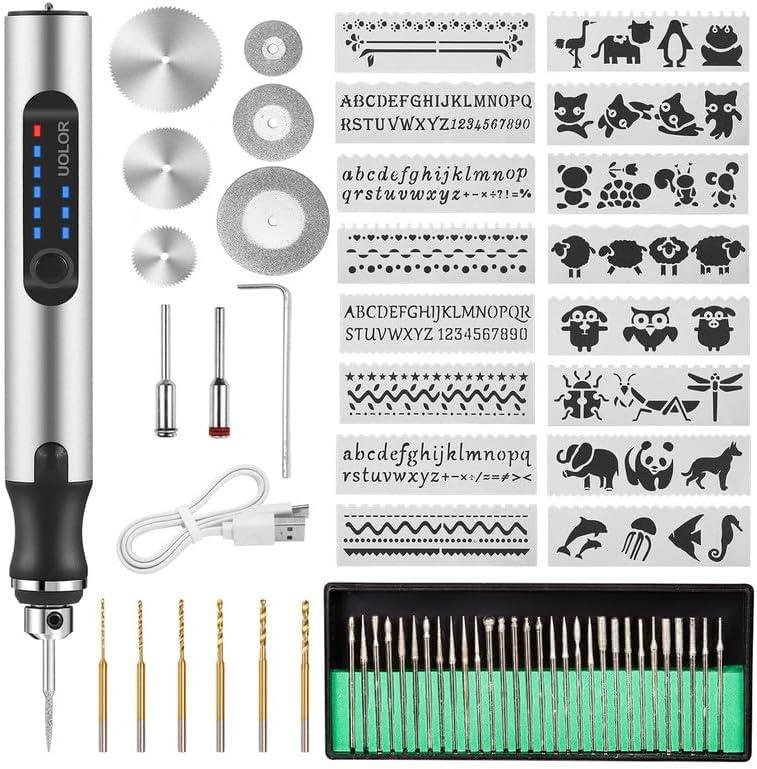
Ever tried adding a crisp maker’s mark to a finished box lid or touching up a carved inlay—only to watch the line wander,burn,or fuzz out because the tool feels too bulky or underpowered? In small-shop woodworking,detail work is where precision matters most,but it’s also where cords,bench space,and budget can get in the way.
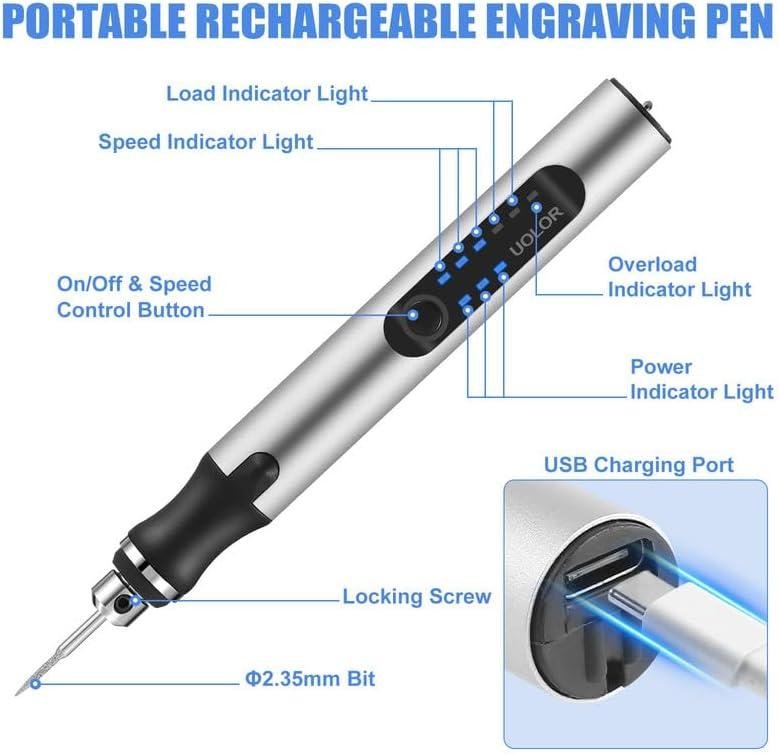
the Uolor USB Rechargable Engraving Pen is a compact, cordless mini rotary/engraving tool that comes with 42 bits, three adjustable speeds (about 5,000–18,000 rpm), and USB charging. it’s designed for light engraving and etching across materials like wood, metal, glass, plastic, and stone, with an overload “smart power-off” protection feature aimed at preventing damage when you push too hard.
In this review, we’ll break down the feature set, bit assortment, ergonomics, and what customer feedback says about real-world usability—especially around power, battery life, and value. we’ll also cover who this pen fits best (beginners, apartment shops, occasional personalization) and who may wont a more robust rotary tool. We’ve spent years around benches and jigs, and we certainly know the fastest way to ruin a project is the wrong tool for the last 5% of the work.
Tool Overview and Build Quality in the Hand
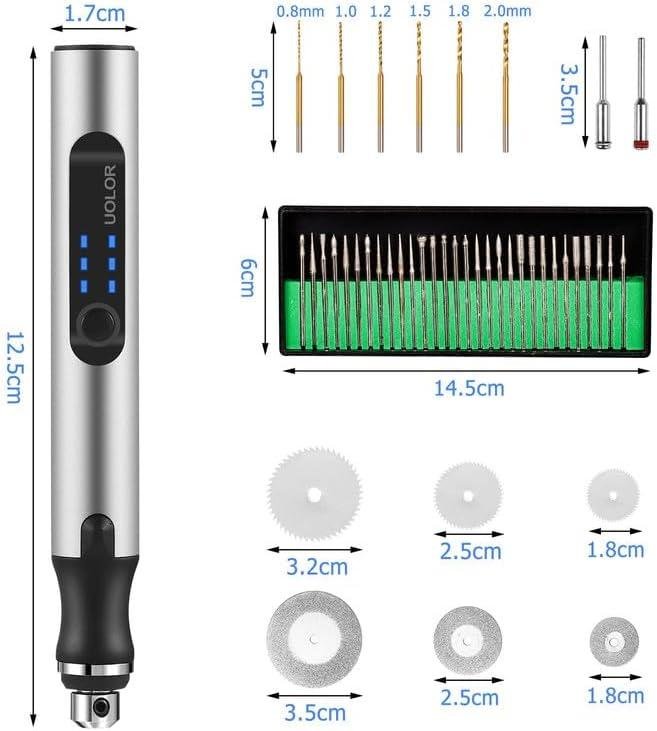
In the hand, the Uolor engraving pen feels more like a fat marker than a full-size rotary tool—which is exactly the point for detail work at the bench. It’s a compact, cordless engraver with 3 speed levels from 5,000–18,000 RPM, charged via USB, so we can keep it on the assembly table for quick touchups without dragging a cord across a freshly sanded panel. Several customer themes line up with that “small-tool” identity: it’s a “nice little dremel tool,” easy to hold and operate, and easy to change bits. Build quality feedback leans positive (many calling it “very well made”), but there are also reminders to treat it like a light-duty precision pen—one reviewer flat-out described it as “not too sturdy, light use only.” For woodworking, that’s a reasonable expectation: this is better for carving initials into a keepsake box lid or tracing a layout line for inlay than it is indeed for hogging out material or running long grinding sessions.
Where the “in-hand” experience really matters is how the tool behaves when we load it up. Uolor includes smart power-off/overload protection, and in practise that means if we push too hard (common when engraving dense hardwood or following end grain), it may stall or shut down rather than twist in our fingers—one reviewer noted it “stops you if you push too hard.” That’s helpful for beginners learning pressure control,but it also reinforces what customers repeatedly mention: power is limited,and the tool is happiest with a light touch and multiple passes. Battery life is also a major build/usage reality; Uolor claims up to 30 minutes idling, while reviews range from “doesn’t last more than 10 minutes” to about 18–22 minutes under heavy use (with one user keeping it plugged in to extend runtime). In our shop, the practical takeaway is simple: plan on short sessions, keep a USB power bank or charger nearby, and use it primarily for fine engraving, light deburring, and small corrections—work where a pen-style grip and modest RPM range are more important than raw torque.
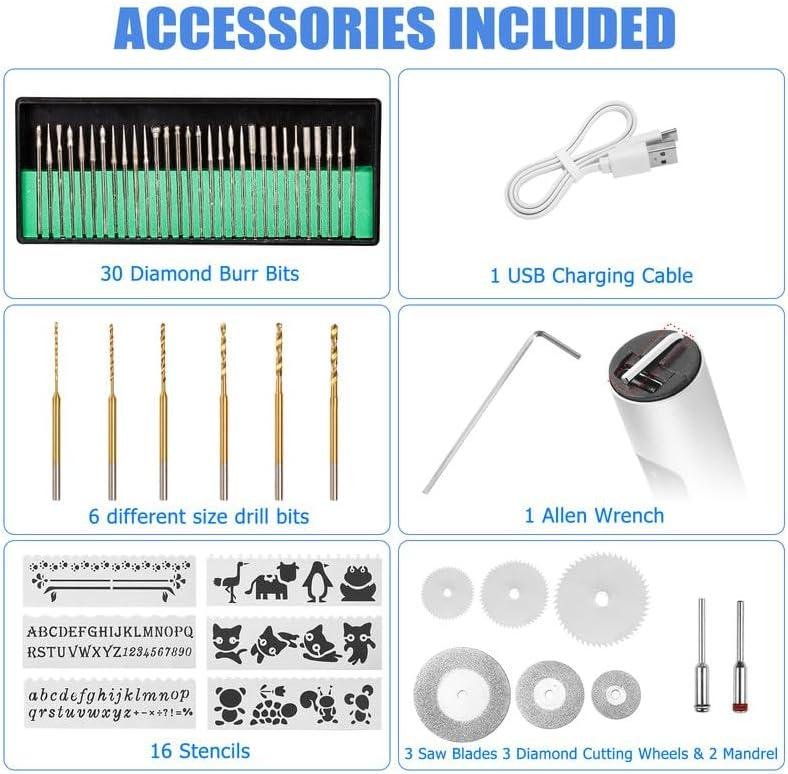
- Included accessories: 42 engraving/rotary bits (variety pack) + USB charging cable
- Compatible attachments/accessories: Small engraving and polishing bits that match the included collet/chuck size (note: some reviewers report bit fit/holder size issues)
- Ideal project types: Name/date engraving on boxes, tool marking, light detail carving, small inlay layout touchups, light sanding/polishing in tight spots
- Wood types tested by customers: general wood (e.g., “engraving an occasional name in wood”), walking stick (species not specified)
| Spec / Feature | What Uolor Lists | Why We Care in Woodworking |
|---|---|---|
| speed range | 3 levels, 5,000–18,000 RPM | Lower speeds help control burning on softwoods; higher speeds help cleaner lines with a light touch. |
| Power management | Overload / smart power-off protection | Reduces runaway grabs, but also means you can’t lean on it like a die grinder. |
| Charging | USB rechargeable | Convenient at the bench; consider plugging in for longer sessions as some reviewers do. |
| Runtime (claimed vs. reported) | Up to 30 min idling; reviews vary (some <10 min, others ~18–22 min heavy use) | Plan for short bursts and keep power nearby; not ideal for extended shaping/sanding. |
| Accessory Type | Included? | Workshop Use |
|---|---|---|
| Engraving/cutting bits (assorted) | yes (42 pcs total) | Lettering, shallow carvings, edge cleanup in corners. |
| Polishing/sanding-style bits (assorted) | Varies by kit assortment | De-fuzzing small areas, light smoothing of carved lines (not broad surface sanding). |
| Third-party micro rotary bits | Perhaps | Useful if the shank/holder size matches—note some reviews cite fitment issues. |
| Task Capacity | Recommended Use | what Reviews Suggest in practice |
|---|---|---|
| Engraving depth / pressure | Light passes, let RPM do the work | Users report it can stall/cut off if pushed too hard; power is a common complaint. |
| Session length | Short jobs, quick mark-making | Battery life is mixed; some report very short runtimes, others get ~18–22 minutes. |
See Full Specifications & Customer Photos
real world Engraving Performance on Hardwood Softwood and Plywood
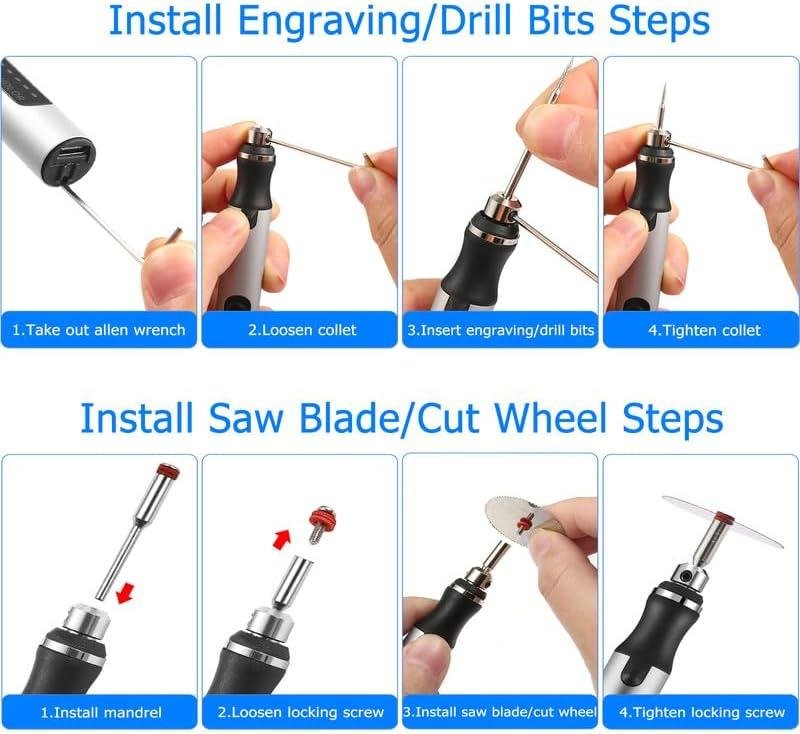
In real shop use, we look at the Uolor as a light-duty detail engraver rather than a do-it-all rotary tool. The specs tell us why: it offers 3 speed levels from 5,000–18,000 RPM and runs on a USB-rechargeable battery (Uolor claims up to 30 minutes idling, while one verified reviewer reports about 18–22 minutes under heavier use). On hardwoods like oak, maple, or walnut, that RPM range is fine for sketching lines, signing the underside of a piece, or adding simple decorative grooves—but we have to treat it like a pen: light pressure, multiple passes, and sharp bits. Several review themes back that up: customers repeatedly call it a “nice little dremel tool” and “easy to hold and use,” but power is a common complaint (“not nearly powerful enough,” “motor is very weak,” and it may “stop you if you push too hard” thanks to the smart power-off/overload protection). For hardwood, our best results come from using the higher speed setting for cleaner lines and letting the bit do the work—forcing it can trigger that cutoff, heat the tool, and widen the cut.
On softwoods (pine, cedar, fir), this pen-style engraver tends to feel more cooperative as the fibers give way faster, but we still need good technique to avoid fuzzy edges and tear-out along earlywood.A tip that helps in the shop: seal the surface with a quick coat of shellac or sanding sealer before engraving, then engrave lightly and clean the lines with a stiff brush—this keeps softwood “hair” from raising as much. For plywood, we have to be even more realistic: it can engrave, but the alternating plies and glue lines can make the tool chatter, and the results depend heavily on bit choice and steadiness. Reviewers are split on capability—some say it “worked well…engraving an occasional name in wood,” while others say it’s “not smooth cutting” or that “cutting bits and power mean you can’t use on a lot of surfaces.” In other words, for plywood templates, shop jigs, and labeling parts, it can be handy; for deep carving, inlay cavities, or removing material like a true rotary tool, it’s not the right class of tool.
- Included accessories: 42 engraving/rotary bits, USB charging cable, stencil templates (gift/holiday patterns per listing)
- Compatible attachments/accessories (best-match add-ons): small diamond burrs, fine-point engraving cutters, small sanding drums (light use), brass wire brush for cleaning engraved lines
- Ideal project types: signing/name engraving on boxes, labeling jigs and fixtures, personalization on tool handles/walking sticks, light decorative linework, touch-up marking before finish
- Wood types tested by customers (from review text/themes): “wood” (engraving names on wood, wooden box, walking stick); woodworkers can reasonably extrapolate similar behavior on pine vs. oak due to the common power feedback
| Spec / Feature | What Uolor Lists | What It Means in a Wood Shop |
|---|---|---|
| Speed range | 5,000–18,000 RPM (3 levels) | Good for light engraving and detail work; not a high-torque carver |
| Power system | USB rechargeable, cordless | Convenient at the bench; expect short sessions—some reviewers report 18–22 min under load |
| Protection | Smart power-off / overload protection | Helps prevent burn-up, but can interrupt cuts if we push too hard in hardwood/ply glue lines |
| Accessories | 42 bits | Versatile starter set; a few reviewers mention fit/collet tolerance issues (“bits wouldn’t fit” / “bit holder too small”) |
| Accessory / Bit Type | Use on Hardwood | Use on Softwood | Use on Plywood |
|---|---|---|---|
| Fine engraving burrs | Best choice for names/lines (light passes) | Very good; watch fuzzing | OK; can catch on glue lines |
| Diamond bits | Good for controlled scratching/etching | Good; keep pressure low | Fair; wear can increase with glue |
| Small sanding drums | Limited—risk bogging/cutoff | Usable for tiny easing/cleanup | Limited; tends to heat quickly |
| Task | Recommended (Realistic) | Often Expected (But Not Ideal Here) |
|---|---|---|
| Engraving depth in hardwood | Shallow lines in multiple passes | Deep carving in one pass (likely to stall/cutoff) |
| Run time | Plan for short sessions (some report 18–22 min loaded) | All-day continuous carving (battery feedback is mixed) |
| Plywood work | Labels, light linework, template marking | Routing channels or heavy removal across glue lines |
See Full Specifications & Customer Photos
Key Features Woodworkers Will Appreciate for Detail Work and Personalization
For detail work and shop personalization, we appreciate how the uolor pen keeps things simple and controllable: it’s a cordless, USB‑rechargeable micro rotary tool with 3 adjustable speed levels rated at 5,000–18,000 RPM. In practice,that low-to-mid RPM range is where we tend to do our cleanest “signature” work—initials on a drawer underside,a quick maker’s mark on a jig,or decorative lines on a small box—without instantly burning the fibers the way higher-speed rotaries can. The built-in smart power‑off/overload protection is also a workshop-amiable feature: when we accidentally lean too hard (common when tracing templates), it’s designed to cut power instead of letting the bit stall and chatter a trench. That matches a recurring customer theme that it “stops you if you push too hard,” which is less frustrating for beginners and a good reminder for all of us to let the abrasive do the work.
Where this tool feels most “woodworker-right” is in the kit mindset: you get an engraver plus a spread of accessories for experimenting, and many buyers describe it as a “nice little dremel tool” with “lots of bit options” that’s “easy to hold and use.” For personalization work, technique matters more than brute strength—several reviews criticize limited power, and we agree that means we should treat it like a detail engraver, not a mini die grinder. The best results typically come from taking shallow passes, using the higher speed for cleaner lines on tight-grained hardwoods, and keeping the tip moving to avoid scorch marks; on softer woods, backing off pressure helps prevent fuzzy edges. battery life feedback is mixed: the product description mentions up to ~30 minutes idling, while one verified reviewer reports about 18–22 minutes under heavy use and recommends keeping it plugged in when possible—good advice if we’re working around the bench and want consistent RPM during lettering.
- Included accessories: 1 engraver pen, 42 bits, USB charging cable, templated stencils (holiday themes listed in the product description)
- Compatible attachments/accessories (typical use cases): small engraving/diamond burrs, small sanding drums, polishing points, fine grinding stones (note: a few reviewers report bit holder/fitment issues, so we’d verify shank fit before buying extra sets)
- Ideal project types: maker’s marks on jigs, name/date on gift boxes, monograms on cutting boards (light touch), decorative linework on small parts, touch-up carving accents, cleaning tight corners on small repairs
- Wood types tested by customers: reviewers specifically mention success on wooden boxes, walking sticks, and engraving names in wood (species not specified)
| Spec / Feature | What the Uolor is rated for | What it means in the shop |
|---|---|---|
| Speed range | 5,000–18,000 RPM (3 levels) | Lower heat and better control for lettering; avoid pressing hard to prevent chatter |
| Power management | smart power‑off / overload protection | Helps prevent motor strain; also encourages proper light-pass technique |
| Power source | USB rechargeable, cordless | Convenient at the bench; battery life varies by load—some users keep it plugged in while working |
| Accessories | 42 bits included | Lets us test multiple tip shapes for fonts, shading, and small clean-up tasks |
| Accessory / Bit Type | Typical woodworking use | Notes from review themes |
|---|---|---|
| Fine engraving bits / burrs | Names, initials, line art, tracing stencils | Often praised for ease of use; power limits mean light passes work best |
| Small grinding/sanding points | Detail shaping on small parts, easing edges in tight spots | Some say it’s “not very powerful,” so expectations should stay in the detail-work lane |
| Polishing points | Cleaning up engraved lines, light smoothing | Battery life feedback is mixed—plan shorter sessions or charge between steps |
| Task (Capacity) | recommended approach | Likely outcome based on specs/reviews |
|---|---|---|
| Engraving names/logos in wood | Higher RPM, very light pressure, multiple passes; practice on scrap first | Several reviewers report it “did exactly what I needed it to do” for wood engraving |
| Light detail sanding/cleanup | Medium RPM, gentle touch, short bursts to manage heat | Good for small areas; not a substitute for a full-size rotary tool under load |
| Heavy cutting/drilling | Not recommended; use a drill, trim router, or higher-power rotary tool | Power is a common complaint (“not nearly powerful enough”) |
See Full Specifications & Customer Photos
Ease of Use for Beginners and Control for Experienced Hands
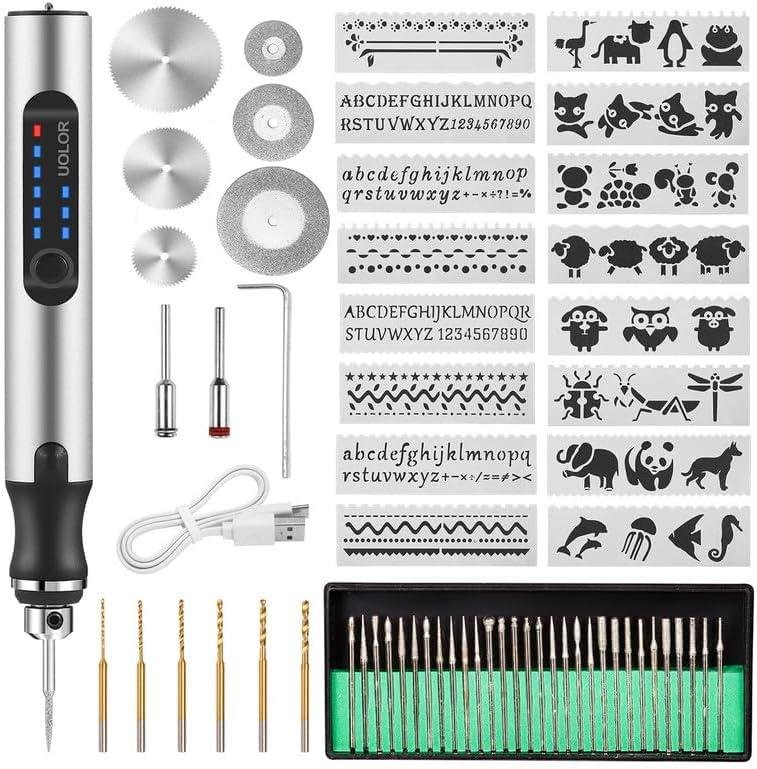
for beginners in our shop, the Uolor engraving pen behaves more like a “pick it up and start practicing” tool than a full rotary system that needs a bench setup.Being USB rechargeable and cordless means we can take it to the workpiece—handy for monogramming a lid after assembly or touching up a maker’s mark on a small project—without dragging a cord across a freshly sanded panel. The 3-speed range (5,000–18,000 RPM) is a friendly learning curve: lower speed gives us a bit more control on softwoods so the bit doesn’t “run away” with the grain, and higher speed helps when we’re lightly tracing layout lines on harder stock (still with a light hand). Review themes line up with that beginner-friendly feel: customers repeatedly call it a “nice little dremel tool” and “easy to hold and use”, with several noting it arrived “easily set up” and feels “well balanced.” For first-time users, the biggest educational takeaway is to let the RPM do the work—use a pencil grip, brace your hand, and “skate” the tip across the surface with minimal pressure to avoid burn marks and chatter, especially on open-grain woods like oak and ash.
For experienced hands, the control is there—within the tool’s limits. The pen includes 42 bits and reviewers like that it has “lots of bit options” and is “easy to change bits”, which helps when we’re switching between a fine point for lettering and a small abrasive for edge cleanup. But multiple customers also warn the motor is “not nearly powerful enough” for demanding tasks, and the overload protection can cut power when we lean in—one reviewer described it as “stops you if you push too hard,” which is protective for the tool but a clear signal this is for engraving, light carving, and detail work—not hogging out waste or drilling hardwood with authority. Battery feedback is mixed: while the listing suggests up to ~30 minutes idling, several reviewers say the battery can be very short (some report “10 minutes”), while one heavy-use reviewer reported “about 18–22 minutes” and mentioned keeping it plugged in to extend use. In practice, that means we treat it like a detail pen we charge frequently enough (or run tethered via USB when possible), and we save heavier rotary work for a corded, higher-torque tool.
See Full Specifications & Customer Photos
Customer Reviews Analysis
What Woodworkers Are Saying (Uolor USB Rechargeable Engraving Pen w/ 42 Bits)
1. Overall sentiment from woodworking customers
sentiment skews positive for light-duty woodworking and personalization. Several reviewers describe it as a “keeper” for occasional engraving and small detail work,especially when the use case is names,simple designs,and touch-up tasks rather than heavy carving or long run times.
2. Performance feedback (accuracy,power,results)
Multiple reviews highlight smooth,effective performance for small,controlled tasks—notably engraving names and adding decorative details.
- Precision/results: Customers successfully used this for “engraving an occasional name in wood,” and one user said it’s “only limited by your talent,” suggesting it’s responsive enough for fine detail when used within its limits.
- Power under load / runtime: Some users noted limited cordless runtime under heavier use—one reviewer estimated about 18–22 minutes on a full charge and preferred keeping it plugged in while working.
- Material limits: Some users reported challenges with power and cutting bits, saying it can’t be used on a lot of surfaces (implying it’s better at light engraving than aggressive cutting/stock removal).
3. Build quality and durability observations
Feedback is mixed.
- common praise includes “very well made” and appreciation for the included accessory kit.
- Some users reported challenges with sturdiness, with one noting it’s “not too sturdy, light use only.” This aligns with the broader theme that it’s best treated as a light-duty engraver, not an all-day rotary tool.
4. Ease of use for different skill levels
Ease of use is a recurring positive point.
- Beginners and DIYers appreciated the straightforward setup, with multiple mentions of it being “easy to use.”
- Bit changes are often described as simple, and the variety of bits helps new users experiment without buying extras immediately.
- However, at least one reviewer ran into a fitment issue: “Bit holder too small… do not match with all the bits,” which can create frustration for less experienced users who expect everything in the kit to be plug-and-play.
5. Common project types and success stories
Reviewers used it for a mix of craft and practical work. Woodworking-adjacent successes include:
- Personalization: Engraving names in wood (a common use case for gifts, shop organization, or tool marking).
- Walking stick detailing: One user specifically mentioned engraving a walking stick, which is a good example of light carving/etching on curved wooden surfaces.
- Tool marking/artwork: Several reviewers mentioned engraving tools and planning artwork projects—suggesting it’s popular for small custom touches rather than structural woodworking tasks.
(Other projects mentioned in reviews include stone engraving and even boat gelcoat crack cleanout, which reinforces versatility—but also that it’s used as a general mini-rotary tool.)
6. Issues or limitations reported
Common limitations are consistent with a compact, rechargeable engraver:
- Short runtime for continuous work: heavy use may drain the battery in under half an hour, and some users prefer operating while plugged in.
- Light-duty only: Some users explicitly describe it as not sturdy and suited to light use.
- Bit/collet compatibility problems: At least one reviewer reported the bit holder doesn’t match all included bits, preventing secure installation.
- Power/cutting constraints: Some users reported the cutting ability and bit performance limit which materials/surfaces it can handle effectively.
| Aspect | Common Feedback |
|---|---|
| Performance | Good for light engraving and detail work; runtime under heavy use often reported around 18–22 minutes |
| Precision/Results | reviews suggest consistent, controllable engraving for names and small designs |
| Build Quality | Mixed—some call it well made; others say it isn’t very sturdy and is best for light use |
| Ease of Use | Frequently described as easy to use with easy bit changes; one report of bit holder/bit size mismatch |
| Versatility | Used on wood, stone, tools, and general DIY cleanup tasks; not ideal for tougher surfaces or heavy cutting |
| Value | Bit variety is a major plus; best value when used for occasional engraving rather than continuous-duty work |
Pros & Cons
Pros & Cons
In our shop, we treat a mini rotary engraver like a “pocket helper”—the kind of tool that earns its keep when we need quick personalization,
light cleanup, or a small etch without firing up heavier gear. The Uolor USB Rechargeable Engraving Pen (42 bits) fits that role in some
satisfyingly handy ways… but it also draws a clear line between hobby engraving and hard-duty grinding.
What We Liked
- Convenient cordless form factor — easy to grab, easy to carry, and genuinely useful for quick tasks at the bench.
- Beginner-friendly learning curve — it’s simple to hold and operate, so we can hand it to a first-timer without a long lecture.
- 3 speed levels (5,000–18,000 rpm) — enough range for experimenting across softer materials and gentler passes.
- Bit variety is the headline feature — the included 42 bits invite trial-and-error (and that’s half the fun for DIY work).
- Overload / smart power-off protection — when we push too hard,it tends to stop rather than self-destruct,which is reassuring at this price tier.
- Great “gift tool” energy — compact,approachable,and geared toward personalization projects (stencils/templates help set the tone).
What We Didn’t Love
- Power is the recurring complaint — for tougher jobs (hard metals, deeper cuts, drilling), it may feel underpowered for our needs.
- Battery life can be a gamble — some users report very short run times; even optimistic real-world use can mean short sessions, not all-afternoon work.
- “Works great” vs “doesn’t work as advertised” split — the mixed functionality feedback suggests inconsistent experiences between units or use cases.
- Bit fit/compatibility quirks — a few reports mention bits not fitting correctly,which can derail a project fast.
- Not ideal for heavy pressure — if we bear down to force progress, the tool may stall or shut off (protection doing its job, but still a limitation).
- Value depends on expectations — for light DIY engraving it can feel like a steal; for demanding shop work it may feel like a false economy.
Our Quick “Use-Case” Scorecard
| Task We’d Use It For | How It Feels in Practice | Our Take |
|---|---|---|
| Names/initials on wood | Smooth enough with light passes | Good fit |
| Glass/stone “surface sketch” etching | Can work, but expectations must be modest | Best for light detail |
| Jewelry marking (light touch) | Useful for outlines and personalization | Okay for beginners |
| Hard metal engraving / drilling | Power limitations show up quickly | Not our first choice |
| Quick cleanup / small rotary tasks | Handy, especially cordless | Nice “bench sidekick” |
Bottom line for this Pros & Cons slice of our review: we like the Uolor best when we treat it like a portable, light-duty engraver—a
tool for quick personalization and experimenting—rather than a mini replacement for a full-strength rotary tool.
Q&A
What wood types can this handle effectively?
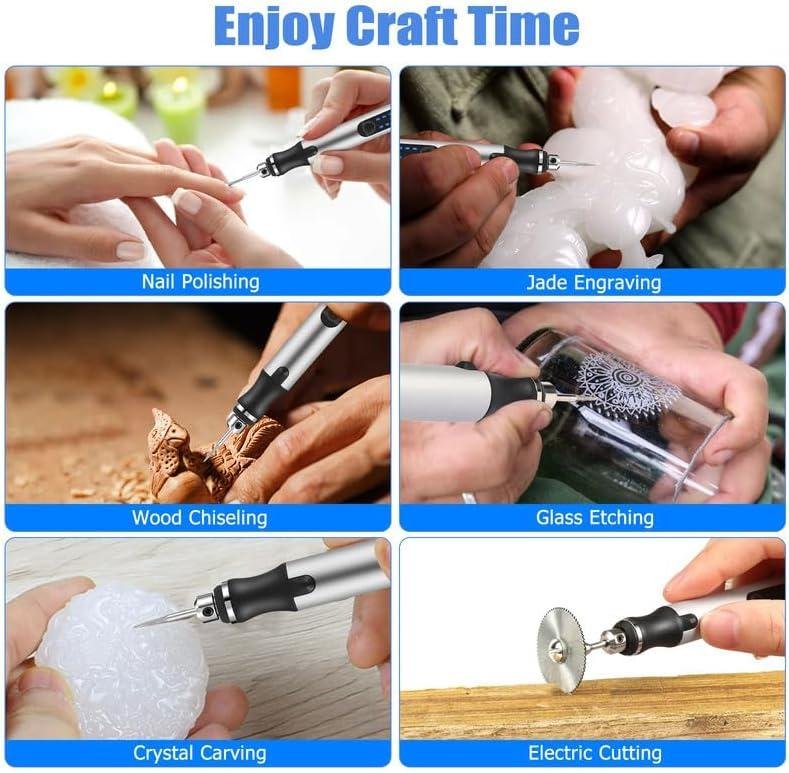
This pen-style engraver is best for softer woods and light-detail work: pine, cedar, poplar, basswood, and similar. On medium woods (birch,cherry),it can still do names,outlines,and shallow carving if you take multiple passes. Reviews generally describe it as a “nice little Dremel tool” for occasional engraving, but not a heavy-material removal tool.
Is this powerful enough for hardwoods like oak or maple?
For hardwoods, think “marks and shallow lines,” not deep carving. Multiple customers call out that the unit “is not nearly powerful enough,” and power is a common complaint. The tool does include overload protection that cuts power if you push too hard, which helps prevent damage but also limits how aggressively you can cut. If your goal is deep lettering in oak/maple or using larger burrs/drills, you’ll likely want a stronger corded rotary tool.
How does it perform on plywood and veneers?
It can work well for light engraving on plywood and veneers, but you’ll want a sharp bit and very light pressure to avoid tear-out and chipping—especially across grain and on thin face veneers. Use the higher speed setting (it’s listed as 3 speeds, 5000–18000 RPM) with a gentle touch, and practice on offcuts first. For clean results on plywood, seal the surface first (shellac or sanding sealer) so the fibers don’t fuzz as easily.
Can this handle production work or just hobby projects?
This is primarily a hobby/occasional-use engraver.The product description claims up to ~30 minutes of idle runtime,but real-world reviews are mixed—several buyers report very short runtime (some as low as ~10 minutes),while at least one verified reviewer reported about 18–22 minutes under heavier use. For production (lots of names, signs, repeated runs), battery inconsistency and limited power make it a risky choice; a corded rotary tool or a higher-end cordless rotary tool will be more consistent.
How difficult is the initial setup, and how easy are bit changes?
Setup is generally simple: charge via USB, choose a speed, and insert a bit. Many reviews mention it’s easy to hold and operate, and that it was “easily set up.” Bit changes are typically straightforward, but there is a known fit/collet issue in reviews: one customer reported the “bit holder too small” and that some bits wouldn’t fit. If you hit that, check that the bit shank matches the collet size included, and contact the seller—one reviewer said customer service fixed a “bits wouldn’t fit” issue quickly.
What adjustments are available (speed/control), and does it protect against stalling?
You get 3 speed levels (listed 5000–18000 RPM). That’s enough range for basic control—lower speeds for careful tracing, higher for cleaner cutting on wood with light passes. It also has “smart power-off/overload protection,” and at least one reviewer noted it “stops you if you push too hard.” That’s useful for preventing burn-out, but it also means you need to let the bit do the work and avoid forcing the tool.
Will this fit in a small workshop, and does it need dust collection or a special outlet?
It’s very small-workshop friendly: it’s handheld, cordless, and charges via USB (so no special outlet beyond a USB port/charger). It doesn’t integrate with dust collection, but engraving and sanding can create fine dust—so use a small shop vac nearby or work over a downdraft box if you have one.At minimum, wear a respirator and eye protection, especially when engraving plywood (glues) or resinous woods.
Is it suitable for beginners, and would it satisfy a professional woodworker?
For beginners, yes—many users say it’s easy to use and a fun entry point for personalizing boxes, handles, walking sticks, and small craft pieces. The limitations are the same ones that frustrate power users: multiple reviews highlight weak power and mixed battery life, and one review describes it as “not too sturdy, light use only.” A professional woodworker may still keep it as a quick, portable detail tool, but it’s unlikely to replace a full-size rotary tool or dedicated carving/engraving setup for daily work.
Experience the Difference
The Uolor USB Rechargeable Engraving Pen is a compact, cordless mini rotary/engraving tool with 3 speed settings (5,000–18,000 RPM), USB charging, and a kit that includes 42 bits plus stencils. It also features smart overload/power-off protection to help prevent damage if you press too hard. in customer feedback, ease of use and overall “nice little Dremel” convenience come up often, while power and battery life are the biggest complaints—some users report short runtime under load and limited cutting/etching strength.
Best for: hobby woodworkers with small to medium projects, beginners learning fundamentals, and cabinet makers who want light-duty precision for monograms, sign work, and detail engraving on boxes, jigs, or tool handles.
Consider alternatives if: you regularly engrave dense hardwoods, need long sessions, or expect production-level durability and torque.
Final assessment: The Uolor offers solid versatility for casual shop use, but its limited power and inconsistent battery reports make it better as a detail tool than a primary rotary platform.
Want to see current pricing and customer photos? View on Amazon & Read More Reviews →