

Blog
Ron Brown Texturing Tool Review: Right for Our Lathe?

Ever get a turning piece off the lathe looking clean,only to realize it still feels a little “flat” and lifeless—yet the idea of carving detail by hand sounds like a slow path to chatter,uneven lines,and blown shop time? When we’re working in tight shops and tighter budgets,every new accessory has to earn its space by adding real,repeatable precision—not just another learning curve.
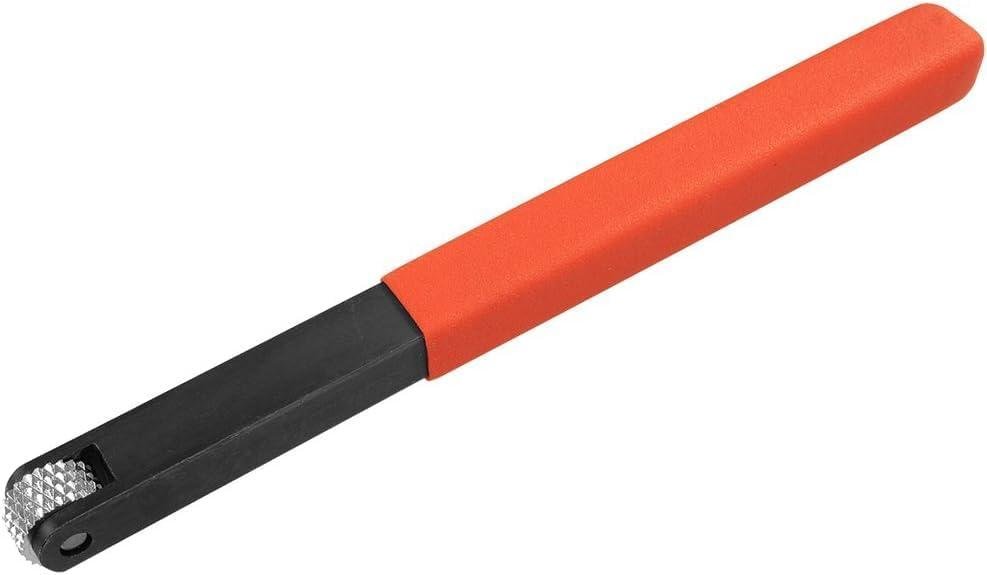
Ron Brown’s Texturizing Tool (1/4″ x 12 TPI) is a wood lathe texturing tool designed to cut decorative patterns on flat and rounded (convex) surfaces—think narrow accent bands on bowl rims and bottoms, plus small projects like tops, ornaments, and boxes.It’s specifically not intended for concave areas, which matters for tool choice and expectations.
In this review, we’ll break down the key specs (the 1/4″ cutter and 12 TPI pattern), build quality and durability claims, ease of control for diffrent skill levels, and what customers commonly report about consistency and results. We’ll also discuss where it fits alongside other mini lathe tools and how to weigh cost vs. capability from a practical woodworker’s outlook.
Tool overview and First Impressions

Ron Brown’s Texturizing Tool is a purpose-built wood lathe accessory aimed at adding decorative texture—think narrow bands on bowl rims, box lids, ornaments, and spinning tops—without having to improvise with makeshift knurling setups.the key spec is right in the name: a 1/4″ cutter head with 12 TPI (teeth per inch), which tends to produce a medium-fine, evenly spaced pattern when it’s presented correctly to the spinning work.From the product description, it’s designed for flat and convex (rounded) surfaces and is explicitly not intended for concave areas, which matches what multiple customers noted in plain terms—“can’t get into corners.” In our shop mindset, that means it’s a great fit for external curves and rim details, but it’s not the tool we’d reach for when trying to texture inside a bowl or deep recess.
first impressions from both the listing and review themes are consistent: this tool comes across as solid in-hand—reviewers repeatedly called it “beefy,” “very sturdy,” and even “build to last,” while a few also felt it was “heavier and wider than it needs to be.” Practically,that extra mass can help calm chatter when you’re learning the presentation,but it may feel bulky for tight layout work or smaller spindle projects. Several customers also mention it’s “easy to use” and “works good,” which tracks with how texturing tools generally behave: once we anchor on a steady tool rest, keep the handle controlled, and let the wheel track with light pressure, the pattern becomes predictable. The educational takeaway is to treat it more like a controlled rolling impression than a scraping cut—start gently, keep fingers clear of the wheel, and avoid forcing it into end grain or edges where it can grab. For woodworkers who want repeatable detail bands and are okay staying on accessible convex/flat areas, the 1/4″ x 12 TPI format looks like a sensible “next step” tool that adds variety without requiring advanced turning skills.
- Included accessories: Not specified in the provided product details (check the listing for exact in-box contents).
- Compatible attachments/accessories: Pairs well with lathe cutting tools, mini woodturning tools, and general lathe tooling (as described).
- Ideal project types: Spinning tops, holiday ornaments, small boxes, narrow decorative bands on bowl rims and bottoms.
- Wood types tested by customers: not specified in the provided customer review snippets.
| Spec / Limitation | Ron Brown Texturizing Tool (This Model) | why It Matters in the Shop |
|---|---|---|
| Cutter size | 1/4″ | Best for narrow texture bands and controlled placement. |
| Tooth pitch | 12 TPI | Determines texture spacing; works well for visible, consistent patterning. |
| Surface compatibility | Flat & convex; not for concave | Explains why reviewers report it can’t reach corners or inside curves. |
| Compatible accessory / Option | When We’d Consider It | Source |
|---|---|---|
| 16 TPI wheel/tool option | For smaller diameter bowls, boxes, or harder woods where a crisper/finer track is preferred | Product description |
| Other lathe cutting tools / mini turning tools | To round out a texturing + shaping workflow (turn to shape first, then texture) | Product description |
| Capacity / Use Case | Recommended (per product guidance) | Actual (as echoed by reviews) |
|---|---|---|
| Accessible geometry | Flat and rounded surfaces | Works well, but limited in corners/concave areas |
| Ease of use | Beginner-kind with proper technique | Often described as easy to use and fun to play around with |
Check Current Price & Reviews on Amazon
Real World Performance on Bowls Spindles and Small Turning Projects
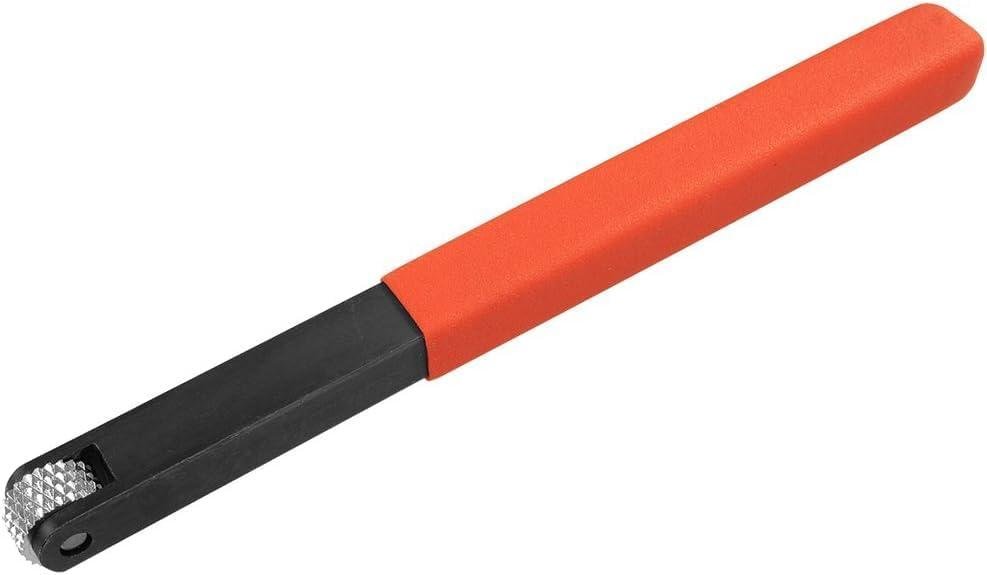
in day-to-day turning, Ron Brown’s texturizer behaves like a dedicated “pattern maker” rather than a cutting tool—once our forms are trued and sanded, we bring in the wheel to emboss controlled texture on flat and convex surfaces. The 1/4″ x 12 TPI wheel is sized for narrow decorative bands, so it feels most at home on bowl rims and bottoms, bead details on spindles, and accent rings on boxes and ornaments. We found it responds best when we keep the tool rest close, present the wheel square to the surface, and use light, steady pressure—too much force can chatter the pattern or skid the wheel. The manufacturer’s note that it’s not intended for concave surfaces matches what turners report in reviews (“can’t get into corners”): inside bowl curves and tight transitions simply don’t give the wheel a clean approach, so we plan our textures where the profile stays accessible.
Customer feedback lines up with what we’d expect from a straightforward, steel-bodied accessory: multiple reviewers call it “beefy,” “sturdy,” and “easy to use,” with several mentioning it’s a great add-on at a great price and even “build to last.” Ther are also a few practical reservations worth knowing before we buy—one theme is that it’s heavier and wider than it needs to be, and another is that the knurl wheel metal feels lower quality to some users, so expectations should be set accordingly. For technique, we get cleaner results by slowing down our feed rate rather than cranking lathe RPM; any vibration, flex, or hurried pass shows up immediately in repeated patterns. For smaller diameter work and harder woods,the product guidance to pair with a 16 TPI option for crisper detail is helpful—finer teeth often track better with less pressure,which is exactly what reduces smearing on dense grain.
- Included accessories: texturizing tool with 1/4″ x 12 TPI wheel (no case or extra wheels noted)
- Compatible attachments/accessories: Ron Brown 16 TPI texturing wheel/tool option (recommended for smaller diameters/harder woods)
- Ideal project types: Bowl rim bands,bowl bottoms,lidded boxes,holiday ornaments,spinning tops,spindle accents
- Wood types tested by customers: Not specified in reviews (customers discuss performance/design more than species)
| Spec / Use Case | What It Means in the Shop |
|---|---|
| Wheel size & pitch: 1/4″ x 12 TPI | Narrow banding and bold,repeatable texture; best on accessible convex/flat areas |
| Surface compatibility | Designed for flat & rounded (convex) surfaces; not for concave corners |
| Tool feel (review theme) | Commonly described as beefy/sturdy; some note heavier/wider than preferred |
| Accessory / Option | When We’d Choose It |
|---|---|
| 12 TPI (this tool) | More pronounced texture on bowls,boxes,and general accent bands |
| 16 TPI option | Smaller diameters and harder woods where we want a crisper,finer pattern with lighter pressure |
| Capacity / Access | Recommended | Actual in Use (Based on Specs + Reviews) |
|---|---|---|
| Concave access | Avoid (per manufacturer) | Reviewers confirm limitations: “can’t get into corners” |
| Best contact zone | Flat & convex surfaces | Consistent,repeatable banding on rims/bottoms/rounded profiles |
See Full Specifications & Customer Photos
Key Features Woodturners Will Appreciate for Consistent Texturing
For getting repeatable texture without a lot of fuss, the core appeal here is the straightforward cutter format: a 1/4″ shaft carrying a 12 TPI texturing wheel designed to track cleanly on flat and convex surfaces. In practical shop use, that spec matters because it naturally lends itself to narrow decorative bands—exactly where inconsistent pressure or an overly wide cutter can telegraph wavy patterns. We like that Ron Brown positions this tool for bowl rims and bottoms and other small turning details (spinning tops, ornaments, boxes), and multiple reviewers echo that it’s “easy to use” and sturdy. The “beefy handle” theme shows up repeatedly, which typically translates to better control when we brace on the tool rest and let the wheel do the work at light pressure—especially useful when we’re learning how feed rate and presentation angle change the look of the texture.
Consistency also comes from understanding the limitations, and reviews and specs line up on that point: this tool doesn’t reach into corners and it’s not intended for concave surfaces. One customer specifically noted it’s “Great but can’t get into corners,” and that’s exactly what we’d expect from a wheel-based texturizer—you need clearance for the wheel to roll. Another theme is heft: a few reviewers called it “beefy” and “heavier and wider than it needs to be,” so if we’re doing delicate finials or tight transitions, that mass can feel like overkill even if it helps stability on open curves. For technique, we’ll get the most consistent results by setting the tool rest close, keeping the handle anchored, and making light, controlled passes; forcing the wheel can tear fibers instead of embossing them. and for smaller diameters or harder woods, the product guidance to pair with a 16 TPI wheel is a useful educational cue—higher TPI generally means a finer, crisper pattern with less aggressive bite.
- Included accessories: Texturizing tool with 12 TPI wheel (as configured: 1/4″ x 12 TPI)
- Compatible attachments/accessories: 16 TPI texturing wheel (recommended by manufacturer for smaller diameters/harder woods); pairs well with other lathe cutting tools and mini woodturning tools
- Ideal project types: Spinning tops,holiday ornaments,small boxes,decorative bands on bowl rims/bottoms
- Wood types tested by customers: Not consistently specified in reviews (customers mainly discuss feel,control,and access limits rather than species)
| Spec / Use-Case | What It Means in the Shop |
|---|---|
| Tool size: 1/4″ | Better suited to narrow texturing bands and detail areas than wider wheels. |
| Wheel pitch: 12 TPI | Moderately fine texture; use light passes for consistent pattern definition. |
| Surface compatibility: flat & convex (not concave) | Expect great results on rims/outsides; don’t plan on reaching into tight coves/corners. |
| Accessory | Why We’d Use It | Notes |
|---|---|---|
| 16 TPI texturing wheel | Finer, crisper texture on harder woods or smaller diameters | Manufacturer suggests it as a pairing option. |
| Standard lathe tool rest | Stability for repeatable patterns | keep rest close; avoid overhang for smoother tracking. |
| Capability | Recommended by design | Actual limitation Noted |
|---|---|---|
| Surface access | Flat/convex areas on small turnings | Can’t get into corners; not for concave shapes |
See Full Specifications & Customer Photos
Ease of Use and Control for Beginners and Experienced Turners
In day-to-day shop use, Ron Brown’s Texturizing Tool feels approachable as there’s not much “setup” beyond mounting it on the tool rest and learning how it likes to be presented to the work. the key spec here—1/4″ size with a 12 TPI (teeth per inch) wheel—translates into narrow, defined decorative bands that are easy to place on a rim or a base once our stance and tool-rest height are dialed in. Since it’s designed for flat and convex surfaces, the learning curve for beginners stays reasonable: we can start on scrap, keep the wheel square to the surface, and let the lathe do the work with light pressure rather than forcing the cutter. Customer feedback backs that up with themes like “easy to use”, a “beefy handle”, and generally “works good / as it should be”—which matches what we’d expect from a purpose-built texturing tool rather than a fussy jig.
For experienced turners, the “control” story is both practical and honest: reviewers consistently note it’s sturdy (“very sturdy”, “build to last”), but some also point out limitations—“can’t get into corners” and the tool being “heavier and wider than it needs to be”. That lines up with the spec guidance that it’s not intended for concave surfaces; tight coves and sharp transitions simply aren’t its playground. Where it shines for us is when we want repeatable, clean patterning on bowl rims and bottoms, lidded boxes, ornaments, or spinning tops—especially when we treat it like a “texture burnisher with teeth”: steady presentation, consistent tool-rest support, and controlled feed rate to avoid chatter. If we’re working smaller diameters or harder woods, the product notes suggest pairing with a 16 TPI version for crisper results, but the 12 TPI is a solid starting point for bold texture that reads well after finish. safety-wise, we’ll keep our fingers clear of the wheel, avoid loose sleeves, and consider a full-face shield—as texturing tools can grab if we get aggressive.
- Included accessories: 1/4″ x 12 TPI texturizing tool (as sold)
- Compatible attachments/accessories: pairs well with lathe cutting tools, mini woodturning tools, and other lathe tooling; consider the 16 TPI companion for smaller diameters/harder woods (per product guidance)
- Ideal project types: spinning tops, holiday ornaments, boxes, narrow decorative bands on bowl rims and bottoms, small turned accents
- Wood types tested by customers: not specified in reviews (customers discuss general turning use rather than named species)
| Spec/Use Factor | What This Tool Offers | Why It Matters in the Shop |
|---|---|---|
| Tool size / wheel | 1/4″ texturing profile | Helps us place tight, controlled bands without overwhelming small forms |
| Tooth pitch | 12 TPI | Delivers a bolder texture; feed rate and pressure control the final look |
| Surface compatibility | Flat & convex; not for concave | Sets expectations: great on rims/outsides, limited in corners/coves |
| User experience theme | “Easy to use”, “beefy handle”, “sturdy” | Confidence for beginners; stable feel for repeatable patterns |
| Compatible Accessory | When We’d Use It | Notes |
|---|---|---|
| 16 TPI companion texturing tool | Smaller diameter bowls/boxes and harder woods | recommended in the product description for crisper results |
| Standard lathe tool rest | All texturing passes | Critical for control; keep rest close to reduce leverage and chatter |
| Capacity Consideration | Recommended | Actual / Practical Reality |
|---|---|---|
| Surface shape | Flat/convex areas (rims, outside curves) | Reviews echo the limitation: “can’t get into corners” |
| Cut aggressiveness | Light pressure, multiple passes | Improves control and reduces the chance of grabbing or inconsistent patterning |
See Full Specifications & Customer Photos
Customer Reviews Analysis
What Woodworkers Are Saying
1. Overall sentiment from woodworking customers
Overall feedback trends positive.Several woodworkers described it as a “nice texturing tool” that “works good,” with common praise centering on sturdiness and it being a worthwhile add-on for woodturners who want to experiment with surface textures. That said, a few reviews flag value concerns (price vs. expectations) and a couple of design limitations.
2. Performance feedback (accuracy, power, results)
Multiple reviews highlight consistent, satisfying texturing results—especially for turners interested in experimenting with different patterns.One reviewer noted you can “make all different types of textures,” suggesting the tool performs well for creative surface effects once you learn how to apply it.
Common praise includes:
- Reliable results for wood-lathe texturing (“works good,” “as it should be”)
- Good texturing capability for woodturners who want variety in surface patterns
Some users reported challenges with:
- Reaching tight areas: “Great but con t get into corners” (limitations around corners/tight geometry)
3.Build quality and durability observations
Build quality is one of the most consistently praised areas. several woodworkers mentioned the tool feels “beefy,” “very sturdy,” and “build to last,” implying confidence in longevity and robustness during use.
However, not all durability feedback is glowing:
- One reviewer felt the knurl wheel “seems lower quality metal,” suggesting mixed impressions on the wheel material versus the rest of the tool.
- Another comment noted it’s “heavier and wider than it needs to be,” implying an overbuilt feel or less refined proportions.
4. Ease of use for different skill levels
Ease of use appears favorable overall. Several reviewers mentioned it’s “easy to use,” and the general tone suggests that even casual turners can get started and enjoy experimenting.
Skill-level notes from reviews:
- DIYers/turners looking to “play around” with textures seemed to enjoy it quickly.
- More technique-driven outcomes (“depending on how to use it… different types of textures”) imply there’s still a learning curve to get specific results, even if the tool itself isn’t tough to handle.
5. Common project types and success stories
Reviews most strongly imply woodturning projects and decorative texturing use cases (rather than flatwork like cabinet doors). Customers successfully used this for:
- General wood-lathe texturing and adding decorative grip/visual patterns to turned pieces
- “Small projects” where experimenting with surface texture is part of the design
Success stories tend to focus on creative variety—getting multiple texture effects from the same tool depending on technique.
6. Issues or limitations reported
A few recurring drawbacks show up in the review set:
- Access limitations: Some users reported it can’t “get into corners,” so tight profiles or corner-adjacent areas may require a different approach/tool.
- Size/weight: One woodworker felt it’s “heavier and wider than it needs to be,” which could matter for comfort, clearance, or fine control.
- value/material expectations: One reviewer said it’s “a little expensive” for what they hoped,and noted the knurl wheel metal seemed lower quality.
Review Summary table
| Aspect | Common Feedback |
|---|---|
| Overall sentiment | Mostly positive—praised as a fun, effective texturing add-on for woodturners |
| Performance | Produces a range of textures with good results; limited reach in corners/tight areas |
| Build Quality | Frequently described as sturdy/beefy and “built to last,” though wheel material quality was questioned by one user |
| Ease of Use | Generally easy to use; better results depend on technique and experimentation |
| Versatility | Good variety of textures possible, especially for turned projects |
| Value | Mixed—some feel it’s a great price, one reviewer found it a bit expensive for expectations |
Pros & Cons
Pros & Cons
| Pros | Cons |
|---|---|
| Makes clean, repeatable textures fast—great when we want “wow” detail without hours of carving. | Not meant for concave surfaces, so inside curves (like bowl interiors) are mostly off the menu. |
| The 1/4″ size is ideal for narrow accent bands on rims, feet, and small feature lines. | 12 TPI can feel less “bitey” on very hard woods or tiny diameters—sometimes we’ll want a finer-toothed companion option. |
| Designed for flat and convex areas, so it plays nicely with the shapes we commonly turn (ornaments, tops, boxes, small bowls). | Texture is a specific look; if our style leans ultra-minimal, it may spend more time on the rack than in the cut. |
| Precision-made and consistent—once we dial in the pressure and presentation, the pattern stays steady. | There’s a short learning curve: too much pressure or the wrong angle can chatter or muddy the pattern. |
| Pairs well with our existing lathe tooling—easy to treat it like an “effects” tool we grab near the end of a project. | Best results frequently enough depend on surface prep; we may need to refine our sanding/cleanup to make the texture truly pop. |
Our Quick Take
- Best for: decorative bands on flat/convex areas—box lids, ornament details, bowl rims and bottoms, and spinning tops.
- Not for: concave areas, or projects where we need texturing deep inside a curve.
- sweet spot: when we want crisp, narrow texture that reads as intentional design—not an afterthought.
Q&A
What wood types can this handle effectively—will it work on hardwoods like maple or oak?
It’s designed to texture wood on the lathe across common turning species, including many hardwoods, as long as you use proper technique (firm tool rest support, light pressure, and controlled feed). For harder woods and smaller diameters, the product notes recommend pairing with a finer 16 TPI version for crisper results.that suggests the 12 TPI wheel can work on hardwoods, but you may get cleaner texture with the finer tooth count when the wood is dense or the workpiece diameter is small.
Can I use it on bowls, boxes, ornaments, and small projects—or is it limited to certain shapes?
This tool is aimed at texturing small-to-medium turning projects like spinning tops, ornaments, boxes, and decorative bands on bowl rims and bottoms.It performs best on flat and convex (rounded outward) surfaces. A key limitation from the product details and user feedback: it’s not intended for concave surfaces and won’t “get into corners” well, so bowls with tight inside curves, deep recesses, or sharp transitions are where it’s least effective.
How difficult is the initial setup—do I need special accessories to use it?
Setup is generally straightforward for anyone already comfortable with basic lathe tool presentation: set your tool rest height so the wheel contacts near centerline, keep the tool stable, and introduce the wheel gradually.It’s made to integrate with typical woodturning setups and “pairs well” with standard lathe tooling and accessories. You don’t need power, sharpening jigs, or a special drive system—this is a hand-held texturing tool used on the tool rest.
What adjustments are available, and how do I control the texture pattern?
The main “adjustments” are technique-based: pressure, dwell time, tool angle, and your feed direction all influence how bold or subtle the pattern appears. Because this is the 1/4″ x 12 TPI version,it excels at narrow decorative bands,and the tooth pitch helps determine the look.If you want a tighter,crisper texture—especially on harder woods or smaller diameters—the listing specifically suggests stepping up to the 16 TPI model rather than forcing this one.
Is this suitable for beginners, or is there a steep learning curve?
Many beginners can use it successfully, but expect a short learning curve to get consistent results. Reviews commonly describe it as “easy to use” and “fun to play around with,” but the same real-world feedback also mentions practical limits like not reaching corners/concave areas. If you’re new to texturing, start on scrap, use lighter pressure than you think you need, and focus on flat/convex areas first for predictable results.
Can it handle production work, or is it more of a hobby/detail tool?
It’s best thought of as a detail/feature tool rather than a high-throughput production solution. The 1/4″ width is intentionally narrow for fine decorative bands, so covering large surfaces takes time. Several users describe it as sturdy and “built to last,” which is a good sign for regular shop use, but if you’re texturing large areas repeatedly, a wider wheel or different texturing approach may be more efficient.
How durable is it, and what maintenance does it need?
Customer feedback frequently notes a “beefy handle,” “very sturdy,” and “built to last,” which aligns with a durability-focused design. Maintenance is minimal: keep the wheel clean of pitch/dust buildup (a brush works well), avoid rust by storing it dry, and inspect the wheel for dings if you accidentally contact metal hardware or the tool rest. One reviewer felt the knurl wheel metal seemed lower quality than expected, so if you’re hard on tools, treat the wheel as the wear item and avoid excessive pressure that can accelerate wear.
is it worth the price compared to cheaper texturing tools?
Value depends on how much you’ll actually use texturing as a design element. Several reviewers call it a “great add” and a “quality tool,” but there’s also feedback noting it can feel “a little expensive” for what they hoped for, and one person mentioned it being “heavier and wider than it needs to be.” If you want a reliable, sturdy tool specifically for narrow decorative bands on flat/convex areas, it tends to satisfy. If you need deep access into corners/concave shapes or want ultra-fine patterns on hard woods, budgeting for the 16 TPI companion tool (or a different style) may be the better spend.
Embrace a New Era
Ron Brown’s Texturizing Tool (1/4″ x 12 TPI) is a purpose-built wood lathe accessory for adding decorative patterns to turned work. The 1/4″ wheel width excels at narrow detail bands, while the 12 TPI pattern produces clean, repeatable textures on flat and convex surfaces (it’s not intended for concave areas). feedback trends highlight a sturdy, “beefy” feel and ease of use, with many woodturners enjoying the creative variety it enables. The most common drawbacks are limited access into corners, a handle some find heavier than necessary, and occasional concerns about value or the knurl wheel’s metal quality.
Best for hobby woodworkers and experienced turners making ornaments, boxes, spinning tops, and bowl rims/bottoms who want reliable, consistent texturing.
Consider alternatives if you frequently enough need to texture tight corners/concave forms, want a lighter tool, or prefer a different TPI (like 16 TPI) for smaller diameters or harder woods.
it’s a solid, durable option for fine texturing—just match it to your project shapes and expectations.
Want to see current pricing and customer photos? View on Amazon & Read More Reviews →